
Where to Mount a Dash Cam

🔬 Telematics Lab: Fleet Field Testing & FMCSA Compliance
Our video safety engineering team verified windshield dash cam placements across Class 1–8 commercial fleet vehicles against three criteria:
- FMCSA Line-of-Sight Compliance: Positioned within federal guidelines (49 CFR § 393.60) — mounted not more than 4 inches below the upper edge of the windshield area swept by wipers, outside the driver's primary line of sight.
- Thermal Adhesive Resilience: Verified 3M VHB automotive tape and suction performance in solar soak tests reaching 160°F (71°C) cabin temperatures without optical shift or detachment.
- Optical & ADAS Clearance: Road-tested behind OEM forward-collision camera housings and rain sensors to guarantee zero obstruction of onboard ADAS radar or lane-departure sensors.
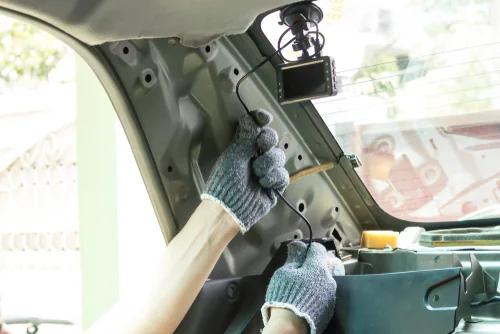
The best place to mount a dash cam is high on the front windshield, centered and directly behind the rearview mirror. This placement gives you the clearest, most balanced view of the road, keeps the camera out of your direct line of sight, stays within the windshield wiper sweep, and makes it easy to route the power cable neatly along the headliner and down the A‑pillar away from airbags.
-
1
Introduction
- 1.1 Best Place to Mount a Dash Cam (Quick Answer)
- 1.2 Ideal Dash Cam Placement (Expert + Driver Consensus)
- 1.3 Best Dash Cam Placement Zones
- 1.4 1) Top Center Behind the Rearview Mirror (Ideal)
- 1.5 2) Top Left or Top Right of the Mirror (Great Alternative)
- 1.6 3) Dashboard Mount (Use Only When Windshield Mounting Is Restricted)
- 1.7 Where NOT to Mount a Dash Cam
- 1.8 Front, Rear & Interior Dash Cam Placement
- 1.9 Front Dash Cam
- 1.10 Rear Dash Cam
- 1.11 Interior-Facing Dash Cam
- 1.12 Is It Legal to Mount a Dash Cam on the Windshield?
- 1.13 How to Install a Dash Cam Properly (Step‑by‑Step)
- 1.14 Common Dash Cam Placement Mistakes to Avoid
- 1.15 Frequently Asked Questions
- 1.16 Where should a dashcam be placed?
- 1.17 Should the dashcam be on the driver or passenger side?
- 1.18 Can I mount a dash cam on the black dots on my windshield?
- 1.19 How do I hide the dash cam’s wires?
- 1.20 Is it safe to put a dashcam on the dashboard instead of the windshield?
- 1.21 Will a dashcam drain my car battery?
- 1.22 Should I enable parking mode?
- 1.23 Do I have to tell cops I have a dash cam?
- 1.24 Will my insurance go down if I have a dashcam?
- 1.25 Do I have to tell my insurance if I get a dash cam?
- 1.26 In what states is it illegal to have a dash cam?
- 1.27 Where can you not use a dash cam?
- 1.28 How much does dash cam installation cost?
- 1.29 Final Thoughts
Best Place to Mount a Dash Cam (Quick Answer)
Mount your dash cam high on the windshield, centered behind (or just below) the rearview mirror. Keep it within the wiper sweep, aim it to capture mostly road (not too much sky), and route the cable along the headliner and A‑pillar behind airbag areas.
Ideal Dash Cam Placement (Expert + Driver Consensus)
Based on professional installation standards and real‑world driver setups, the ideal dash cam placement is:
High on the front windshield
Centered and directly behind the rearview mirror
Within the windshield wiper sweep (so rain/grime doesn’t ruin footage)
Angled for a balanced view: ~60–70% road and 30–40% sky
Shifted slightly passenger-side if ADAS/factory sensors block the center
Cable routed along the headliner and down the A‑pillar (tucked and secured), not in front of airbags
This setup delivers the best visibility and video quality while staying discreet and compliant with most windshield obstruction rules.

Best Dash Cam Placement Zones
1) Top Center Behind the Rearview Mirror (Ideal)
This is the most recommended placement for front-facing dash cams.
Why it works best:
Wide, balanced view of the road and traffic ahead
Hidden from the driver’s direct field of vision
Usually within the wiper sweep for clearer footage
Easy, discreet cable routing along the headliner
Less noticeable from outside the vehicle
Angle tip: Start with 60–70% road and 30–40% sky. Too much sky can cause exposure/white-balance issues and darken the road.
2) Top Left or Top Right of the Mirror (Great Alternative)
If the center area is blocked by:
ADAS sensors
Large mirror housings
Factory cameras
mount the dash cam slightly to the passenger side of the mirror.
What to watch for:
Don’t block your view
Keep the lens within wiper coverage
Avoid placing it where it may interfere with sensors
3) Dashboard Mount (Use Only When Windshield Mounting Is Restricted)
Dashboard mounting can be useful in regions with stricter windshield rules, but it’s usually a second‑best option.
Pros:
Can help comply with some windshield obstruction restrictions
Easier access to buttons/SD card
Cons:
Lower viewing angle (may miss more of the scene)
More glare/reflections
Higher heat exposure
Higher risk of loosening over time
If you must dash‑mount, choose a low‑profile mount, minimize reflections, and re-check alignment periodically.
Where NOT to Mount a Dash Cam
Avoid placing your dash cam:
In the driver’s direct line of sight
On or near A‑pillars where airbags deploy
Outside the windshield wiper sweep
Where tinted dot matrices (“black dots”/frit) block the lens or weaken adhesion
Near rain/light/lane‑assist sensors or factory camera housings
Loose on an unreliable suction mount in very hot climates
Improper placement can reduce video quality, increase distraction, and create safety risks.
Front, Rear & Interior Dash Cam Placement
Front Dash Cam
Mount high behind the rearview mirror as described above.
Rear Dash Cam
Rear cameras should be mounted:
On the upper center of the rear windshield
With a clear, unobstructed view behind
Away from defroster lines when possible (or position to reduce interference)
For dual‑channel kits, rear cams are typically connected to the front unit for reliable power and synchronized recording.
Interior-Facing Dash Cam
Interior cameras (rideshare/fleet/commercial use) should be:
Mounted near the windshield, angled toward the cabin
High enough to discourage tampering
Positioned to capture occupants while staying out of the driver’s view
Is It Legal to Mount a Dash Cam on the Windshield?
In many regions, dash cams are legal as long as they do not obstruct the driver’s view. However, rules vary by state/country, and may differ for suction mounts, placement zones, and audio recording.
Key legal considerations:
Windshield obstruction rules (how much of the windshield can be covered)
Restrictions on suction‑cup mounts in some areas
Audio recording consent laws (one‑party vs all‑party consent)
Different rules when crossing state or national borders
Best practice: Mount the dash cam high behind the rearview mirror so it’s as discreet as possible and less likely to be considered an obstruction.
How to Install a Dash Cam Properly (Step‑by‑Step)
Clean the mounting area with alcohol and let it dry
Power the camera temporarily and preview the angle before sticking it
Mount high behind the mirror (centered if possible)
Set the angle for ~60–70% road and 30–40% sky
Route the cable along the headliner (tuck it under trim)
Run the cable down the A‑pillar carefully
Important: Route the cable so it does not sit in front of the airbag deployment path
Choose your power option:
12V socket (simplest)
Hardwiring kit (best for parking mode and clean wiring)
Secure excess cable with clips/zip ties for a clean finish
Hardwiring is recommended if you want parking mode and long‑term reliability.
Common Dash Cam Placement Mistakes to Avoid
Even a great dash cam can record unusable footage if mounted poorly. Avoid these common mistakes:
Mounting too low (misses more of the scene)
Blocking your view or creating a distraction
Placing it outside the wiper sweep (rain/grime ruins footage)
Routing cables in front of A‑pillar airbags
Mounting on the dotted black frit where adhesion is weaker
Aiming too much sky (leads to dark, underexposed road footage)
Frequently Asked Questions
Where should a dashcam be placed?
Ideally high on the windshield behind the rearview mirror, within the wiper sweep, aimed for a road‑dominant view.
Should the dashcam be on the driver or passenger side?
If you can’t mount dead center due to sensors, placing it slightly passenger-side behind/next to the mirror is often best. It stays out of your sightline and keeps a strong forward view.
Can I mount a dash cam on the black dots on my windshield?
Usually no. The dotted frit area can reduce adhesion and may partially block the lens.
How do I hide the dash cam’s wires?
Tuck the cable along the headliner, down the A‑pillar, and under trim panels. Use clips or a trim tool. Keep wiring away from airbag deployment paths.
Is it safe to put a dashcam on the dashboard instead of the windshield?
It can be legal and sometimes necessary, but it often creates more glare, heat exposure, and a lower viewing angle. Windshield mounting is usually better if allowed.
Will a dashcam drain my car battery?
Not when installed correctly. Hardwiring kits typically include a low‑voltage cutoff to protect the battery.
Should I enable parking mode?
Yes, if your camera supports it and you hardwire properly. Parking mode can record incidents while you’re away.
Do I have to tell cops I have a dash cam?
In many places, you don’t have to volunteer it unless asked. Audio recording rules can vary, so check local laws.
Will my insurance go down if I have a dashcam?
Some insurers may not offer automatic discounts, but dash cam footage can help prove fault and speed up claims.
Do I have to tell my insurance if I get a dash cam?
Policies vary. It’s usually not required, but it can be useful to mention if you ever need to submit footage for a claim.
In what states is it illegal to have a dash cam?
Most states allow dash cams, but some regulate windshield obstructions and audio recording. Always check current local rules.
Where can you not use a dash cam?
Restrictions can apply in sensitive locations (e.g., certain workplaces/government facilities) and where audio/video recording is limited. When traveling, verify local laws.
How much does dash cam installation cost?
Professional installation often ranges from $75 to $250+, depending on the vehicle and whether you’re installing front, rear, and/or interior cameras.
Final Thoughts
Correct dash cam placement is essential for clear footage, driver safety, and legal compliance. For most drivers, the best setup is high and centered behind the rearview mirror, within the wiper sweep, with clean cable routing along the headliner and A‑pillar away from airbags.
Whether you’re installing a single front camera or a dual/triple‑channel system with rear and interior coverage, proper placement ensures you get the most value, and the most reliable evidence, when it matters.
For more information on parking mode, loop recording, and dash cam costs, explore our related guides.
Article Author & Reviewer
35+ years engineering commercial video telematics, dual-facing camera hardware, and FMCSA-compliant fleet installations.
Related Resources
- Best AirTag Alternatives (2026): Top Trackers for iPhone, Android, Wallets, and Business Assets January 19, 2026
- Commercial Fleet Insurance: Everything You Need to Know December 08, 2025
- CARB Compliance: What It Means and How to Stay Compliant December 04, 2025