Bring telematics events, speeding trends, driver scores, and supporting video into one coaching workflow. Fleet.Net helps safety managers identify recurring risk, prioritize the drivers who need attention, document conversations, and measure improvement over time.
Improve Your Fleet Safety & Real-Time Driver Coaching With Our Innovative Driver Scoreboard Camera System
Our innovative Driver Scoreboard Module revolutionizes the way fleet managers monitor and improve fleet safety. Powered by our cutting-edge dashcam and driver-behavior technology, the module provides a comprehensive solution for identifying, managing, and coaching risky driving behaviors—ultimately enhancing the overall safety and productivity of your fleet.
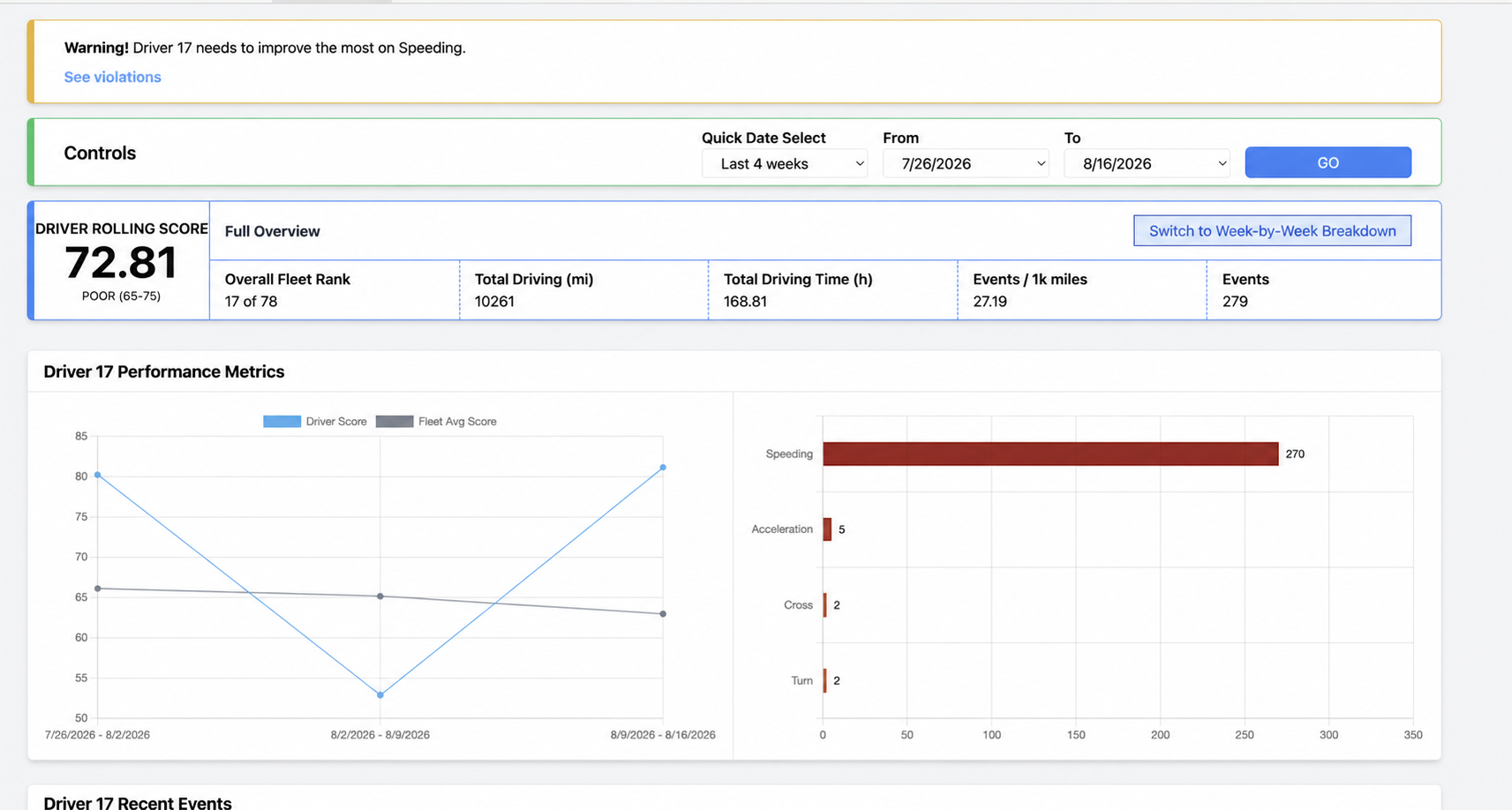
Driver Scoreboard is a point-based driver measurement matrix that scores drivers’ performance over a rolling four-week average.
Driver Scoreboard is most beneficial when a dashcam is installed in the vehicle. With every supported violation, a photo snapshot or optional video clip is uploaded to Fleet.Net and displayed in Driver Scoreboard for review and coaching. Fleets without cameras can still benefit from the scoring and telematics data, but they will not have video footage of the event.
Among its many capabilities, Driver Scoreboard compares each driver’s performance and behavior with other drivers in your fleet.
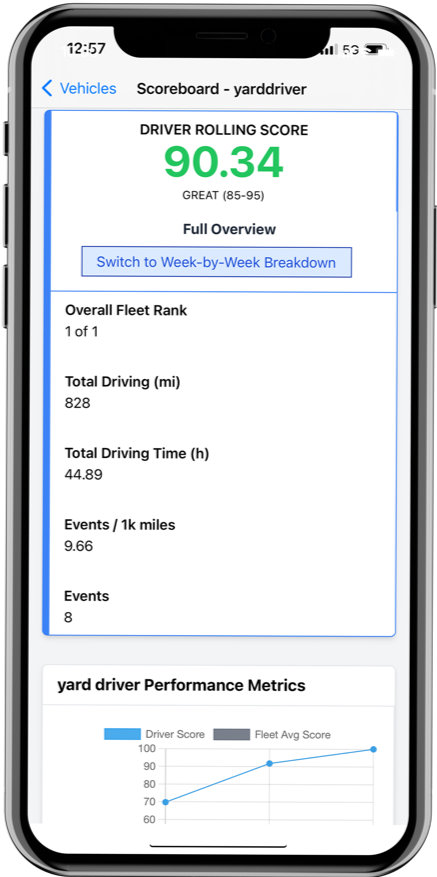
The DriverLink app gives drivers a real-time view of supported safety violations and their current performance, helping them understand which behaviors are affecting their score while the event is still fresh.
That immediate visibility makes coaching more relevant and actionable. Drivers can review their violations, understand the expected correction, and monitor improvement, while managers use the same Fleet.Net event record for clear and consistent follow-up.
Review supported violations and current driver-score information from the mobile app.
Connect each coaching conversation to the behavior that affected the score.
Track progress over the rolling four-week measurement period.
Driver Scoreboard Module
Turn Driver Behavior Into Measurable Safety Improvement
Our innovative Driver Scoreboard Module changes how fleet managers monitor and improve fleet safety. Powered by Wireless Links dashcam and driver-behavior technology, it helps teams identify, manage, and coach risky driving behavior—improving safety and productivity across the fleet.
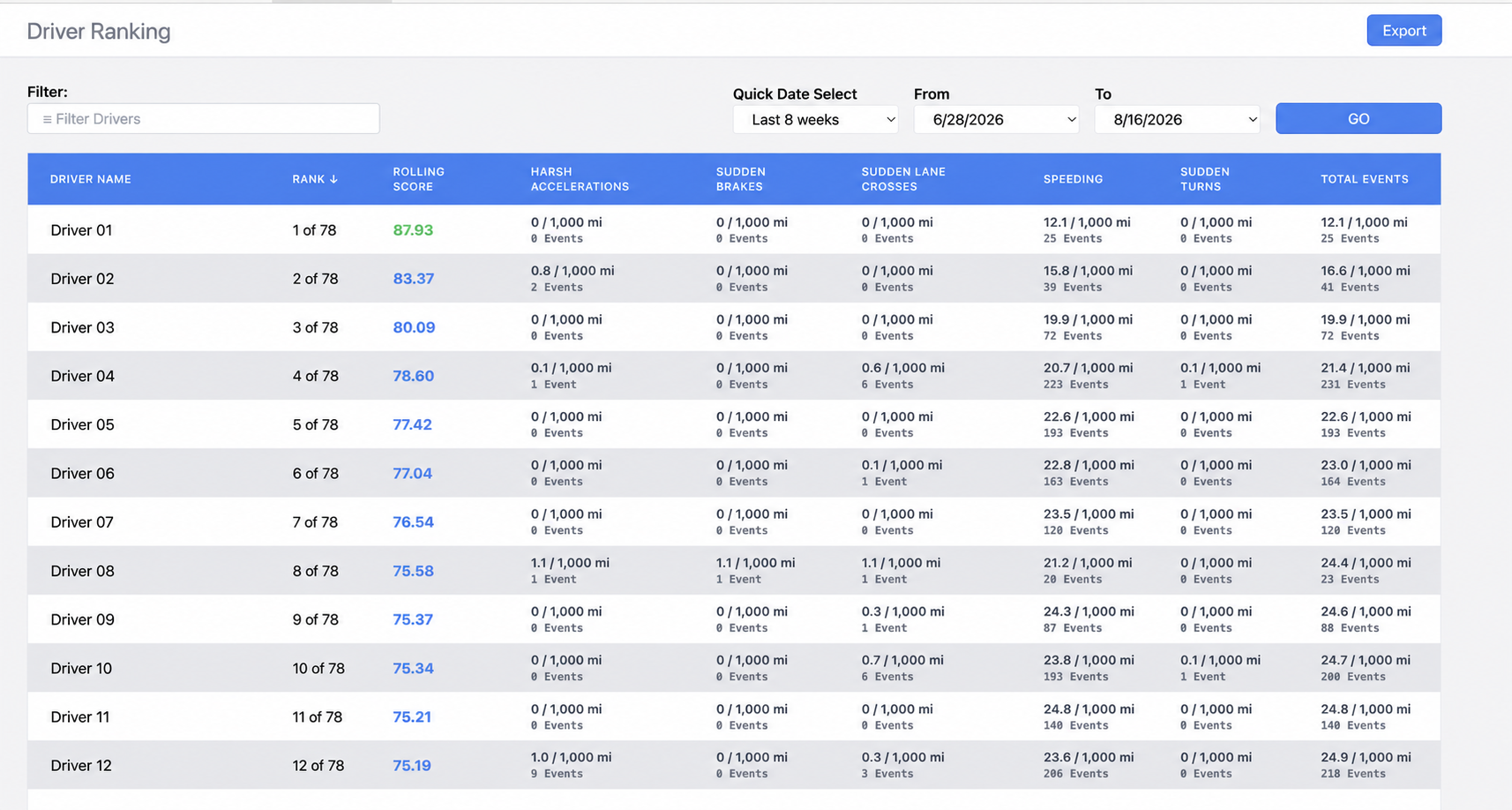
The point-based measurement matrix scores each driver over a rolling four-week average and compares performance with other drivers in the fleet. Managers get a clear, at-a-glance view of recurring risk and the drivers who may require additional coaching or attention.
1
Start at 100 Points
Every driver begins with a score of 100, creating a consistent baseline across the fleet.
2
Detect Risk Events
Points are deducted for supported events such as speeding, sudden braking, rapid acceleration, and other risky driving.
3
Configure Event Weights
Managers set the weight of each violation—for example, two points for speeding and one point for sudden braking.
4
Rank the Rolling Average
Drivers are ranked using a rolling four-week average that reveals sustained patterns instead of isolated incidents.
Actionable Safety Insights
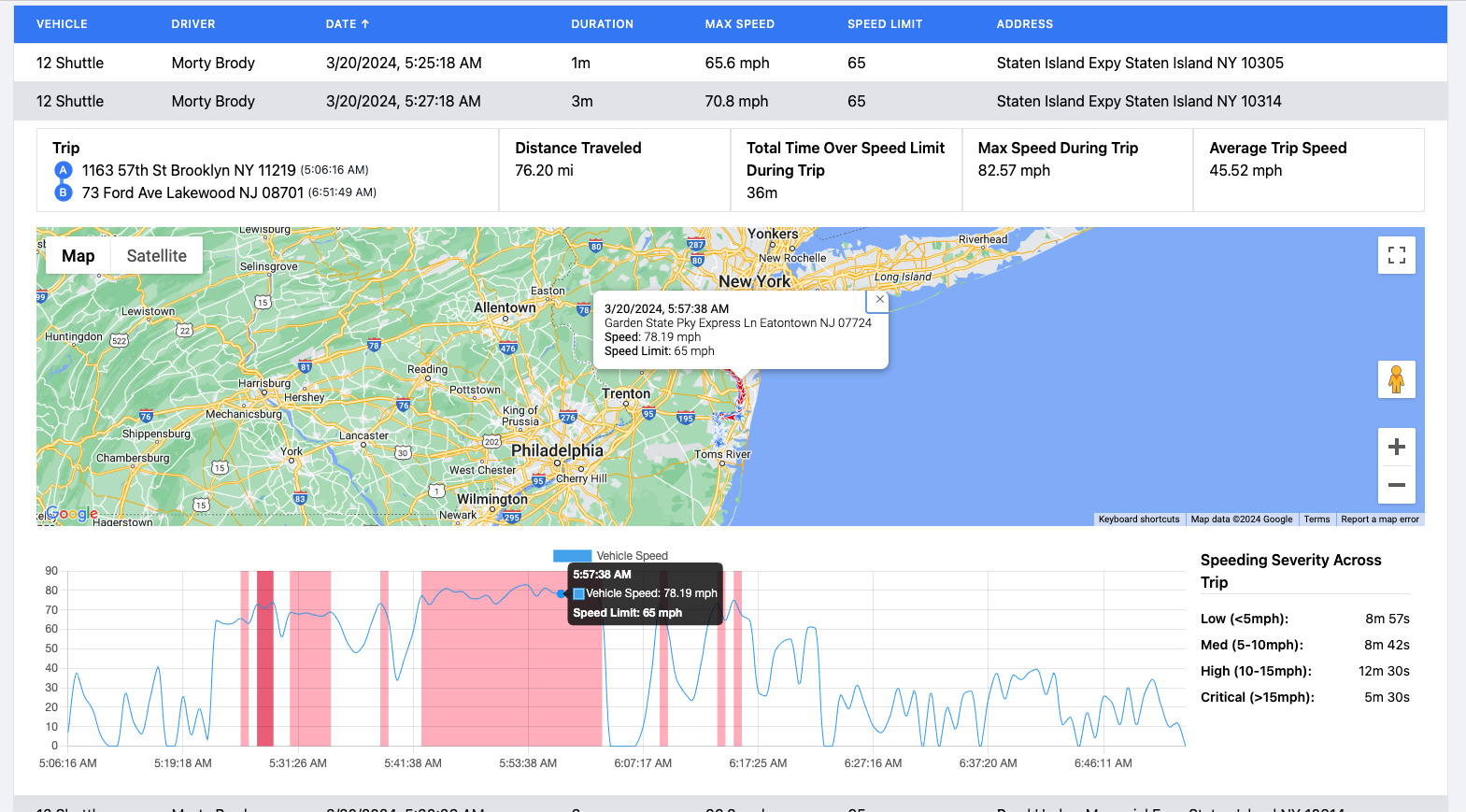
Understand Speeding Frequency and Severity
Review speeding events by driver and vehicle, including duration, location, and severity relative to available posted-speed data. Fleet-wide views help separate occasional exceptions from repeated high-risk behavior.
Use these trends to prioritize coaching, reinforce fleet policy, and measure whether corrective action is reducing repeated speeding behavior.
Comprehensive Event Footage Access
Coach with Evidence, Not Assumptions
When a dashcam is installed, supported violations can include a photo snapshot or optional video clip in Fleet.Net, giving managers objective evidence for review and coaching.
Driver Scoreboard is most valuable when paired with a Wireless Links dashcam. Available event footage helps managers build a more accurate driver profile, review the circumstances surrounding an incident, and provide timely, specific feedback.
Fleets without cameras can still use Driver Scoreboard to compare scores and telematics-based events; they simply will not have the corresponding photo or video evidence for review.
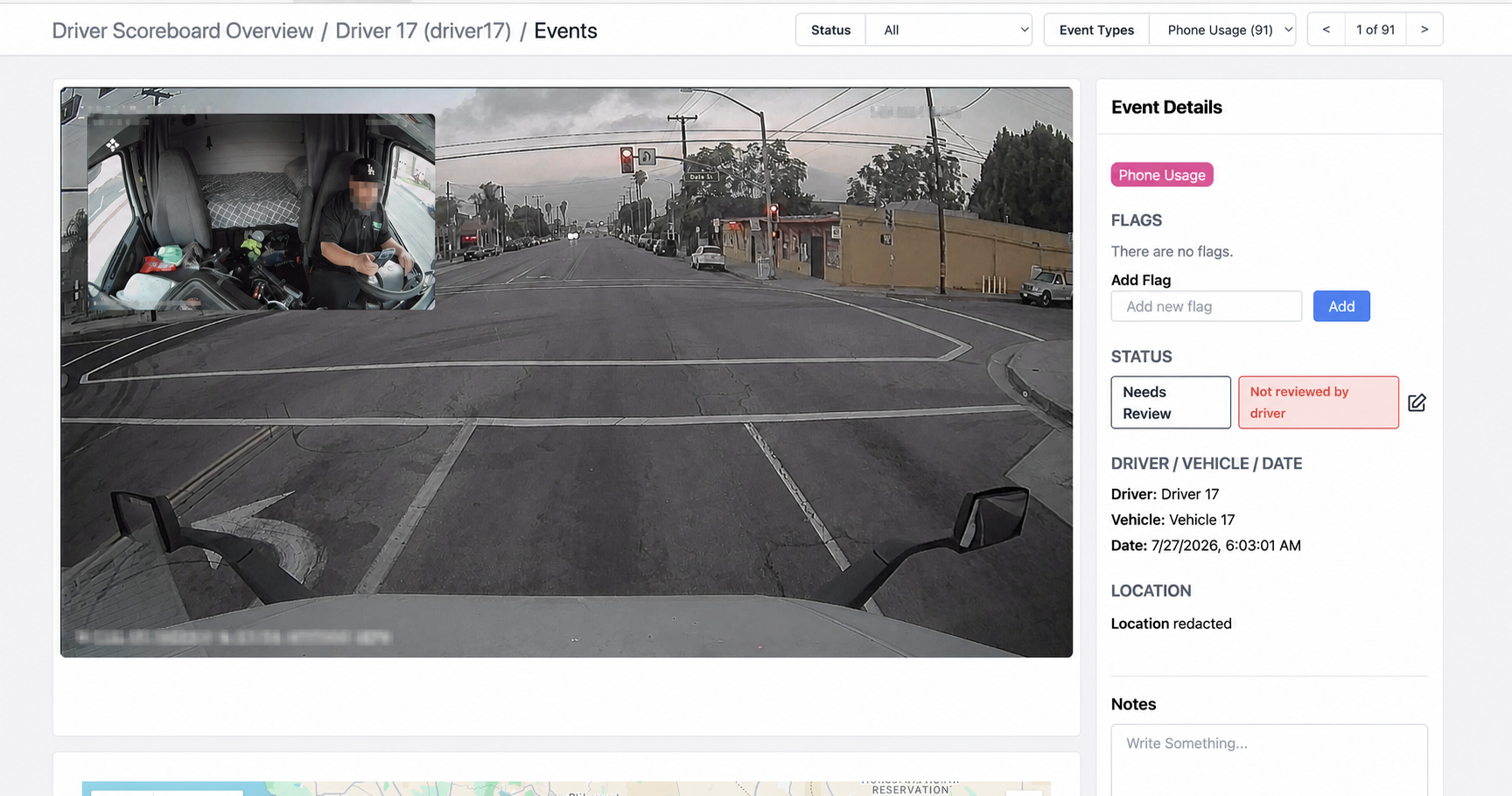
Review Phone Usage with Road and Cabin Context
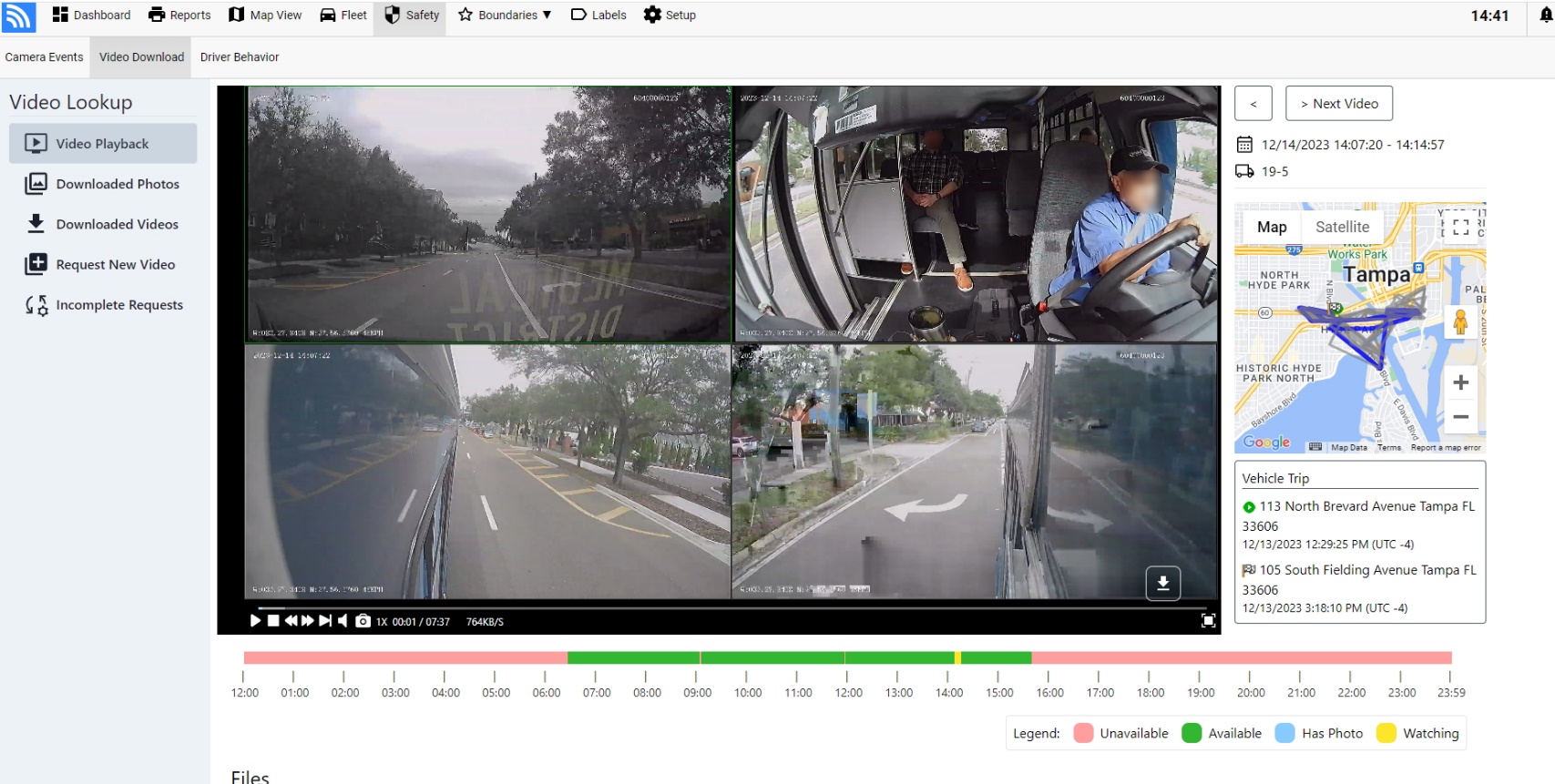
Use synchronized road and cabin footage to verify supported phone-usage detections, document review status, and coach from objective event evidence.
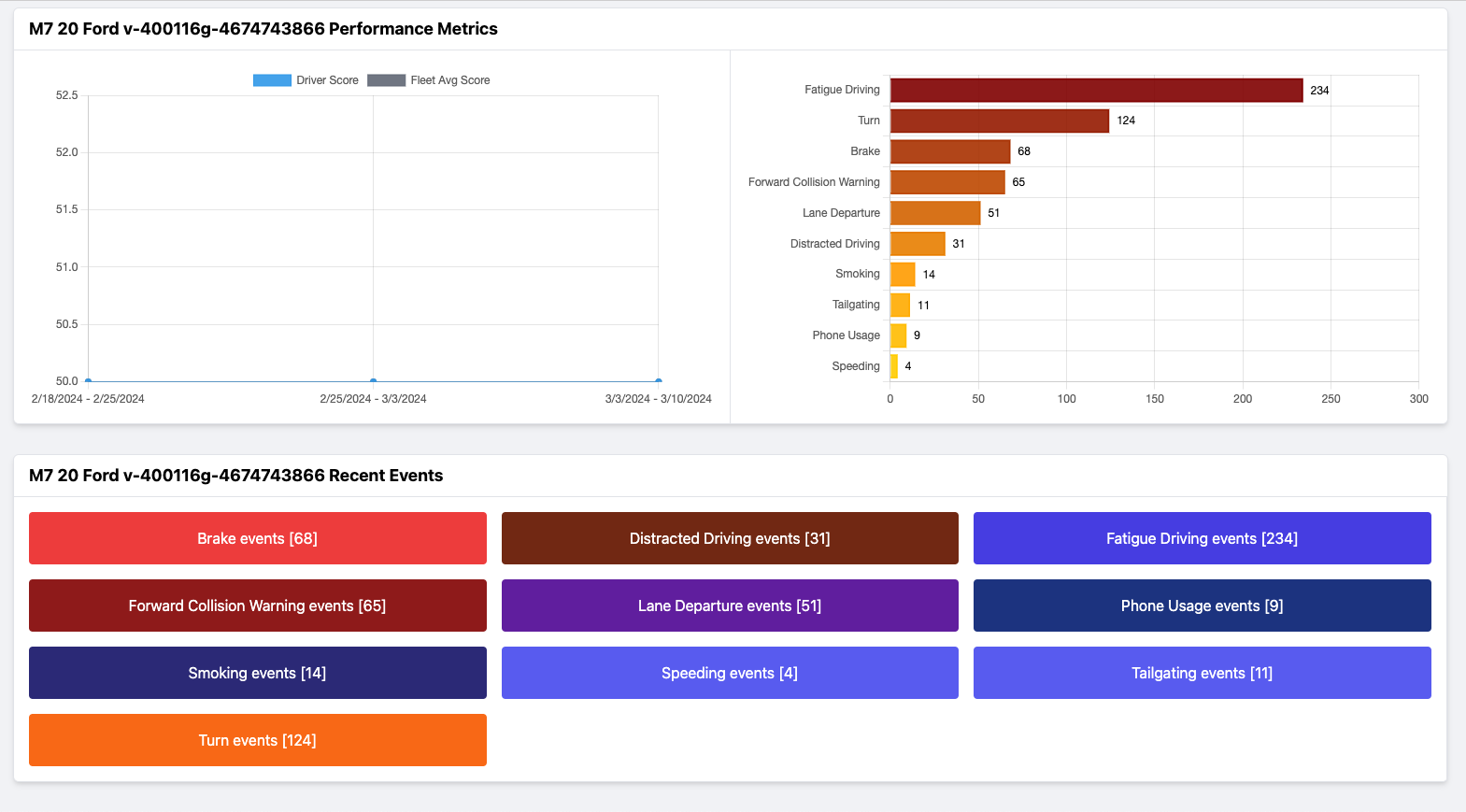
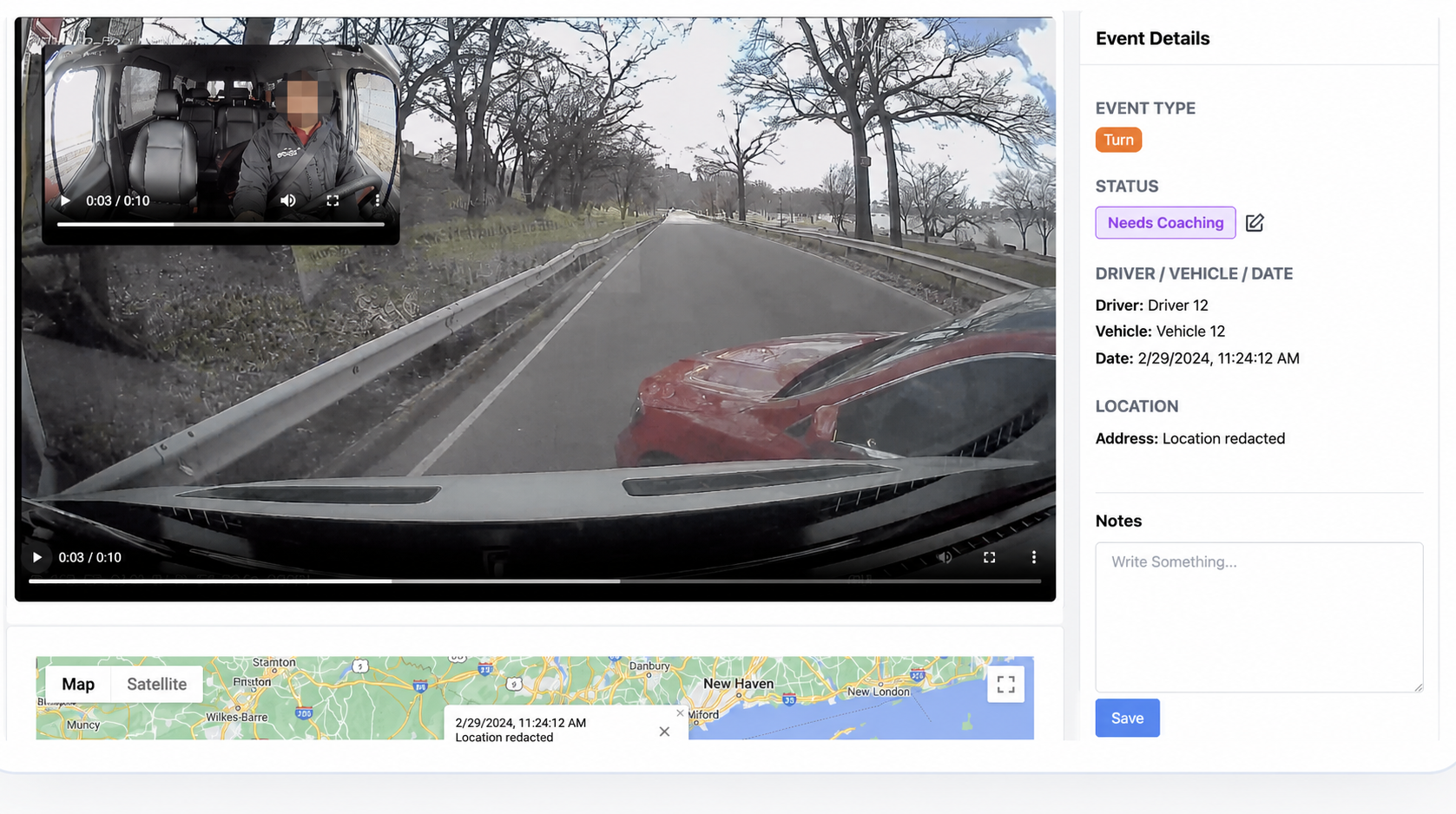
Coach from a Complete Event Record
Review the event video alongside its driver, vehicle, timestamp, coaching status, and mapped location before documenting feedback or corrective action.
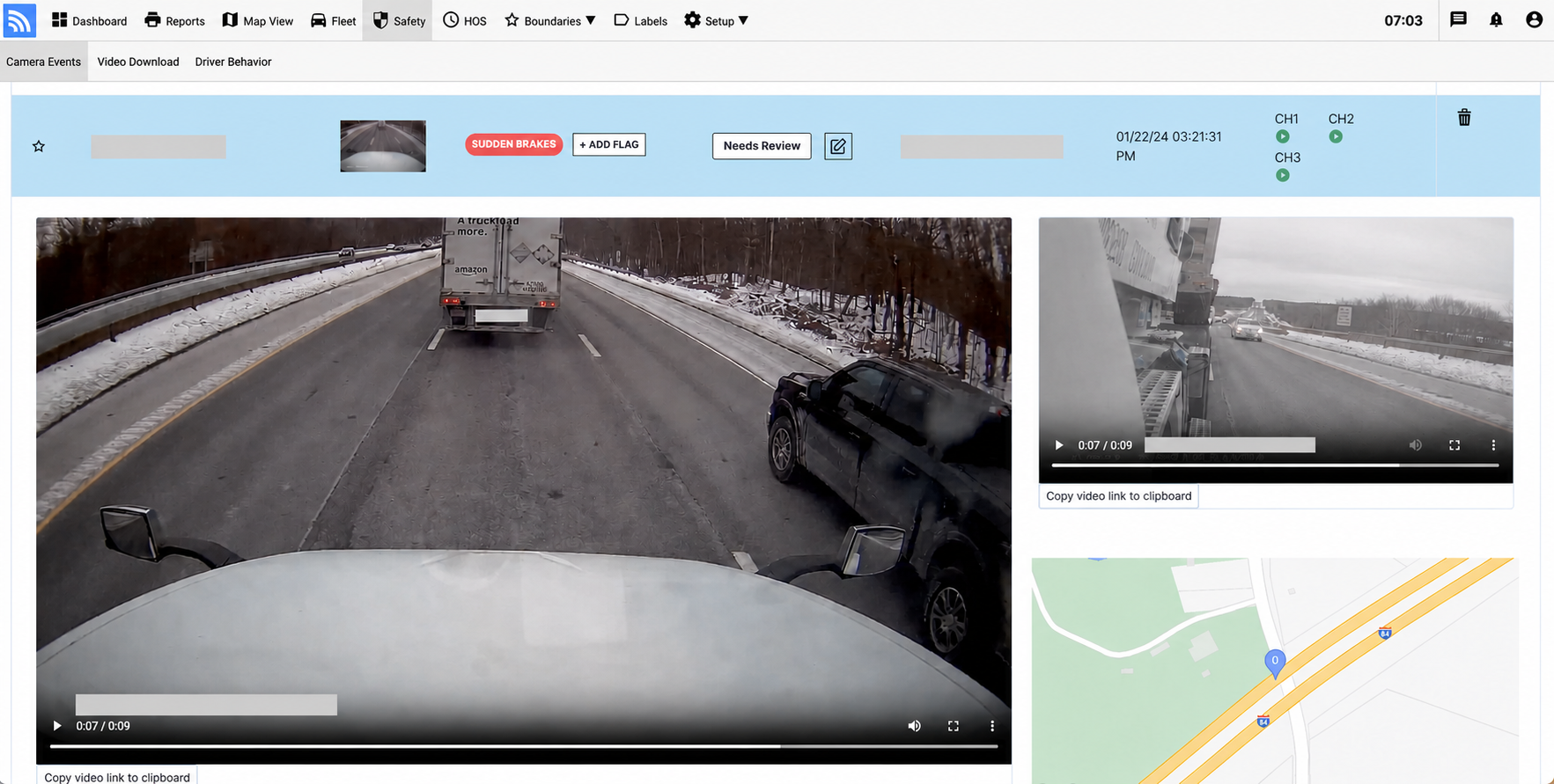
Review Every Event in Context
Connect available video with the driver, vehicle, timestamp, event type, and mapped location before coaching or taking action.
Retrieve Supporting Video
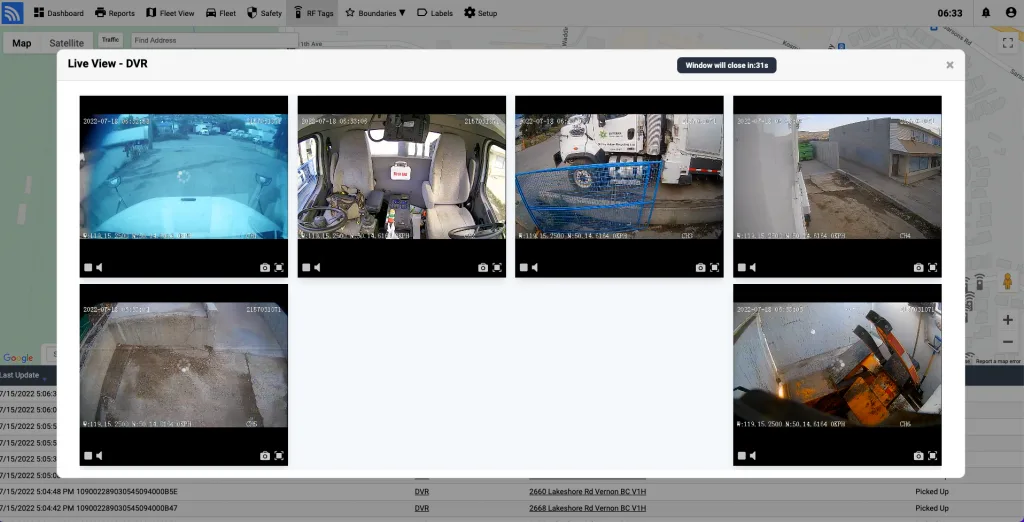
Use available multi-camera and historical footage to investigate incidents beyond automatically uploaded event clips.
Connect Coaching to the Right Camera System
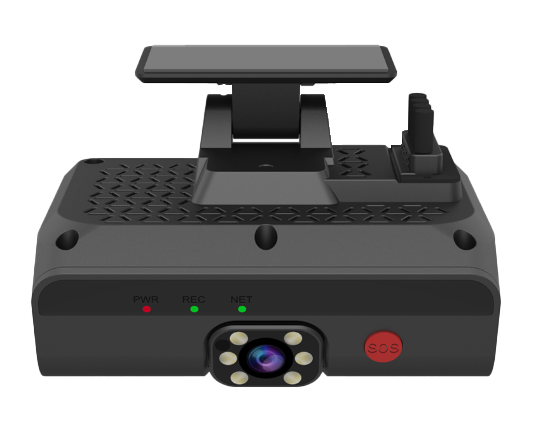
Choose an AI dashcam for focused road and driver events or a multi-channel MDVR system for broader vehicle coverage. Both can connect video context with Fleet.Net telematics and safety workflows.
The AI2020X DashCam
Dual-facing AI camera system featuring 1080p road view and infrared cabin night-vision for distraction & tailgating warnings.
Answers to key questions on effective coaching methods, manager vs in-cab coaching, driver privacy, and AI analytics.
What is the most effective type of driver coaching?
Effective coaching is specific, evidence-based, and consistent. Review each driver’s trends and relevant events together, discuss what happened, agree on practical improvements, and document follow-up so coaching addresses the behavior that matters most.
What is the difference between in-cab coaching and manager-led coaching?
In-cab coaching involves real-time feedback to the driver from technology (such as DashCams) installed in the vehicle (e.g., alerts for speeding or harsh braking). Manager-led coaching is more traditional and involves supervisors or fleet managers reviewing driving data and providing feedback during one-on-one sessions or performance reviews.
How do I effectively coach my drivers?
Use video and telematics context to set clear expectations, recognize improvement, and follow up consistently. The goal is a repeatable coaching process that helps drivers understand risk and gives managers a fair way to measure progress.
How do you coach a driver?
Coaching a driver involves several steps: 1) Gathering objective data & video evidence from Fleet.Net; 2) Meeting one-on-one to review specific safety events; 3) Discussing alternative driving actions; 4) Setting measurable improvement targets on the Driver Scoreboard; 5) Re-evaluating score trends over rolling 4-week periods.
How does effective coaching contribute to improved outcomes in your fleet?
Consistent coaching can help drivers understand risk patterns and reinforce safer habits. Outcomes depend on policy, training quality, follow-up, working conditions, and how fairly the program is implemented.
What is the driver behavioral style?
Driver behavioral style refers to the characteristic patterns of behavior a driver displays while operating a vehicle. This can include how a driver responds to stress, interacts with other road users, and adheres to traffic laws. Understanding these behaviors helps in tailoring coaching sessions to modify any risky driving habits.
How do I get driver buy-in for dash cams without them feeling micromanaged?
Explain the purpose of the program, document when footage is recorded and who can access it, involve drivers in policy development, and apply coaching consistently. Road-facing-only configurations may be appropriate where cabin video is unnecessary or restricted.
How is AI improving driver coaching?
Compatible AI cameras can flag configured behaviors and help safety teams prioritize events for human review. Managers should validate the footage and context before using an automated detection in coaching or disciplinary decisions.